How to Create Studio Ghibli-Style Art with AI: The Artist's Guide
An animator named Maya spent years mastering traditional 2D animation. Hundreds of hours. Thousands of drawings.
Then she tried using AI to generate backgrounds in a Ghibli-inspired style.
One prompt. One image. 30 seconds.
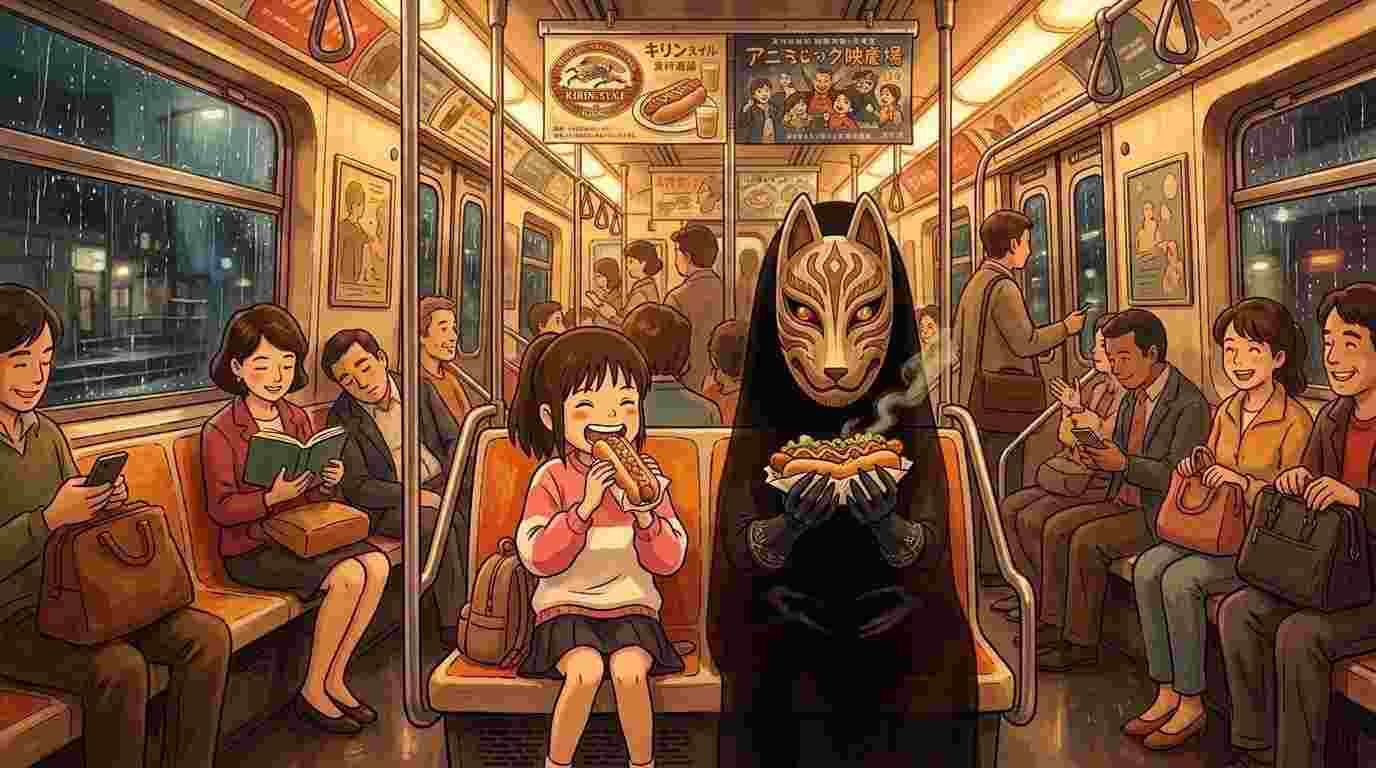
The result wasn't perfect. But it captured the feeling, the hand-drawn beauty, the soft colors, the meticulous detail that Ghibli films are famous for.
"If AI can do the tedious 20%, I can spend my time on the meaningful 80%," she said later.
10 Tips for Creating Ghibli-Style Art with AI
1. Start With the Mood, Not the Scene
What most people do: "A girl in a house"
What artists do: "A girl in a cozy Japanese farmhouse during golden hour, soft warm light streaming through paper screens, peaceful and nostalgic, Studio Ghibli style"
Why it works: Ghibli art is about feeling first, details second. Start with the emotional atmosphere. Add the visual details after.
Pro tip: Use words like "serene," "melancholic," "whimsical," "ethereal." These emotional anchors help the AI understand the mood you're going for, not just the scene.
2. Reference the Specific Film
Ghibli made many films. They have different visual languages.
Spirited Away = Art deco, Eastern mythology, vibrant colors, magical architecture
Howl's Moving Castle = Romantic, European-inspired, warm color grading, soft pastels
Princess Mononoke = Dark greens and browns, forest warfare, naturalistic, more serious tone
Nausicaä = Post-apocalyptic, desert aesthetic, softer than Mononoke but still moody
The Wind Rises = Detailed machinery, sepia tones, architectural precision, nostalgia
Pro tip: Name the specific film in your prompt. It dramatically improves results.
Example: "A steampunk city in the style of The Wind Rises, detailed architecture, sepia tones, hand-drawn quality"
3. Use Color Palette Words, Not Just Colors
Weak: "A girl with blue hair"
Strong: "A girl with blue hair, pastel color palette, soft lighting, warm and cool tones balanced"
Why: Ghibli doesn't use random colors. Colors are curated — soft, harmonious, intentional.
Common Ghibli palettes:
- Warm earth tones + deep emerald (Princess Mononoke)
- Pastels + gold accents (Howl's Moving Castle)
- Vibrant jewel tones + deep shadows (Spirited Away)
- Desaturated blues + burnt orange (Nausicaä)
Pro tip: Describe the overall color mood before listing specific colors. This helps the AI understand the harmony you want.
Example: "Soft, muted color palette with touches of deep forest green and warm ochre"
4. Emphasize Hand-Drawn Quality
AI loves photography. You need to actively ask for not photorealism.
Always include one of these:
- "Hand-drawn illustration"
- "Animation cel art"
- "Painted illustration"
- "Anime style illustration"
- "2D animation frame"
Pro tip: Combine it with "high detail" or "intricate" to make it detailed AND hand-drawn, not soft and simplified.
5. Describe Composition, Not Just Subject
Ghibli films are famous for thoughtful composition. Wide shots. Negative space. Characters small against vast landscapes.
Instead of: "A girl walking through a field"
Try: "A small figure of a girl walking through an expansive meadow, seen from distance, soft wildflowers in foreground, misty mountains in background, rule of thirds composition"
Pro tip: Use compositional terms:
- "Leading lines" (paths, rivers guiding the eye)
- "Layered depth" (foreground, midground, background clearly separated)
- "Negative space" (empty space that feels intentional)
- "Centered composition" (subject in the middle, symmetrical)
6. Add Atmospheric Details
Ghibli scenes breathe. They're full of atmospheric elements.
The difference:
- Weak: "A forest"
- Strong: "A misty forest with dust motes floating in golden sunlight, dappled shadows, mushrooms on the forest floor, moss-covered rocks, atmospheric perspective"
Atmospheric words to use:
- Mist / fog / haze
- Dust motes / light particles
- Dappled light / filtering light
- Bokeh / soft focus background
- Atmospheric perspective (distant objects blurry)
- Volumetric lighting
Pro tip: Atmospheric elements add the "magic" quality that makes Ghibli feel special.
7. Use Architectural and Cultural Details
Ghibli films are obsessed with detail. Traditional Japanese architecture. European buildings. Machines. Objects.
Instead of: "A house"
Try: "A traditional Japanese farmhouse with a steep tiled roof, wooden beams, paper screens, a small garden with stepping stones, traditionally decorated"
Pro tip: Research the specific architecture/design you want. Don't guess. "Victorian steampunk architecture" works better than "old building."
8. Specify Lighting Direction and Quality
Lighting is everything in Ghibli films.
Instead of: "Bright"
Try one of:
- "Golden hour lighting" (warm, low angle, magical)
- "Soft diffused light" (overcast, no harsh shadows)
- "Dramatic side lighting" (one side bright, other in shadow)
- "Volumetric light rays" (god rays streaming through atmosphere)
- "Moonlight" (cool blue tones, mysterious)
Pro tip: Ghibli often uses "golden hour" or "soft, warm diffused light." These are safe defaults.
9. Include Character Design Details (If You're Generating Characters)
Ghibli characters have a specific look. Not realistic, not manga-exaggerated.
Include:
- "Large expressive eyes"
- "Delicate facial features"
- "Soft, flowing hair"
- "Period-appropriate clothing with realistic folds and texture"
- "Natural, expressive poses"
Instead of: "An anime girl"
Try: "A young woman with large expressive eyes, soft features, flowing black hair, wearing a traditional Japanese kimono with intricate patterns, standing in a serene pose, peaceful expression, Ghibli animation style"
10. Iterate With Negative Prompting
If the AI generates something you don't want, tell it to exclude it.
Example: Your first attempt has too much photorealism. Tell the AI:
"Studio Ghibli style art, NOT photorealistic, NOT 3D rendered, NOT CGI, hand-drawn illustration only"
Common things to exclude:
- "NOT photorealistic"
- "NOT anime/manga"
- "NOT 3D CGI"
- "NOT realistic human faces" (if they look too real)
- "NOT oversaturated colors"
- "NOT movie poster style"
Pro tip: Start with what you want. If it's wrong, add what you don't want in the next attempt.
Should You Try AI as an Artist?
If you're asking yourself this question:
Yes. Learn it.
Not because it will replace you. But because it will expand what you can do. It will let you explore ideas faster. It will give you more time for the parts you love.
The artists who master this now, who understand both traditional art principles and how to prompt AI, will be the ones leading creative work in 2027 and beyond.
The tools are here. AI-PRO gives you access to multiple AI image generation tools and 14+ other AI tools under one roof.
The question is: how will you use them?